
Hello everyone!
This is going to be a long one. FancyChat, my chat replacement add-on for FFXI’s third-party loader Ashita, came out for CatsEyeXI in May 2026, which was the goal from the very beginning, and a few months later it was released for HorizonXI and for the retail server too. So I sat down with the pile of backups, folders and zip files that accumulated over almost two years and tried to reconstruct how it actually got here. This is the result: the story of FancyChat from the first ugly experiments to today, with the code that gave me the most trouble along the way.
A few notes before we start. I kept the dates to months, because I sometimes made an archive on one day and released a version a few days later, so exact days would not mean much. I checked what I could against my own files and backups, and the rest comes from my memory, and the screenshots hide anything that belongs to my characters or to other players. The post is organised by periods of time, so you can jump straight to the one you are curious about, and the technical parts are mixed with the story on purpose. If you just want to try the add-on, you will find the repository at the end.

FancyChat today: two chat windows, All on the left and Combat on the right (the text was generated for this post).
December 2024: when a chat window just needed to move
FFXI’s own interface does not let you move its elements around. That was not a big deal until I started using other add-ons whose own interfaces I wanted to combine with the game’s UI, and nothing ever fit together the way I wanted. The chat window was the one that bothered me the most, so the question became very simple: what if the chat window could be placed anywhere?
There was a second reason, which I only realised once I started: if I was going to replace the chat anyway, I could also make it look a lot better than the game’s own.
To give you an idea of what I was up against, this is the game’s own chat window next to FancyChat, showing the same text, with the same number of lines (FancyChat adds timestamps, colours and icons):

The game’s own chat (left) and FancyChat (right), with the same lines.
The first answer was a proof of concept so small it hardly deserves the name: a square on which I rendered incoming messages, using the Ashita API and the gdifonts library by Thorny. Not even the “Fancy” part existed yet: the earliest experiments I still have on record were called BetterChat. Below are two recordings of those experiments that I had saved (cropped to a single line, because the chat in them is full of other people’s names). The two clips were recorded very close to each other, so I honestly do not know how the version numbers got mixed up. The one in plain white text, without any colours, is the older of the two.


In the title bar of one of those clips you can even read the path of the file I was editing, Ashita\addons\betterchat\betterchat.lua, with a utils.lua next to it. So the add-on was called BetterChat from its folder to its welcome message, and the numbering started over when it became FancyChat.
Look at the garbled boxes in the first line: that is the very first appearance of a problem that will come back several times in this story. FFXI does not send plain text to the chat, and anything that is not a normal letter turns into garbage unless you do something about it.
There is another trace of this stage that I only found while digging for this post. In my old Ashita configuration the file imgui.ini, where ImGui remembers the position of every window, still contains an entry for it:
[Window][BetterChat]
Pos=80,114
Size=400,200
A fixed 400 by 200 ImGui window called BetterChat. That window did not survive for long: the ImGui interface that Ashita offered at the time (4.16) had limitations that made it a poor fit for a chat, so I started right away with gdifonts to render the text myself, and kept ImGui only for the things where it is really good, such as settings windows and buttons. A commented-out window of the same kind is still sitting in the oldest backup I have, forgotten and harmless.
I was not completely new to Lua and Ashita when I started. My experience was limited to a few small add-ons: SkillWatch and FancyTrusts (plus the Geocompass you may have seen in a previous post).
The Ashita Discord server was my first stop. Back then there were no good chat replacements around, and at the beginning it was hard to get across what I was trying to do. I explained myself poorly, and from their side the feeling was that a perfect chat replacement was probably not possible: at best, they said, one could create a window and render the chat messages in it, and that would be all. I never believed that was the limit, but I am still grateful for the help I got there, because it pointed me in the right direction.
January 2025: a backup a day
The oldest zip I have is dated January 2025, and it is already a surprisingly complete thing: about 1,970 lines of Lua, a chat window drawn with gdifonts (Consolas, bold, size 23, with an outline), a tab bar (with fewer tabs than today: I added dedicated ones as I realised I needed them), scrolling, click to copy a line, settings saved through the Ashita settings library, and a combat parser. The name had changed too: by then it was fancychat, described as “Fancy Chat!”. The “Better” in the old name was meant as “better than the game’s own chat”, which seemed obvious to me, but some other add-on developers read it as “better than my add-on”, so I changed my naming strategy and the add-on became FancyChat. The oldest FancyChat files I can date (two image files) are from mid-December 2024, so this was the result of a few weeks of work.
The numbering restarted with the new name, so the oldest FancyChat zip is version 0.1, and this is how it greeted you when it loaded:

FancyChat 0.1: the welcome line and the very first tab bar, with its tiny gear button.
The heart of it was, and still is, the text_in event. Every line that the game sends to the chat passes through there, so it was the natural place to catch it, classify it by its chat mode, store it in the buffer of the right tab, and optionally block the original game chat:
local mode_pre = bit.band(e.mode,  0x000000FF);
if mode_pre == 152 or e.blocked then e.blocked = true; return; end
if mode_pre == 190 then
    if allSettings.blockAll[1] and not(fcw[1].HideChat or uiw.LegacyChatOpen) then e.blocked = true; end
    return
end
table.insert(b_OriginalBuffer, tostring(bit.band(e.mode, 0x000000FF))..'|'..os.date('[%H:%M:%S]', os.time())..' '..e.message)
(This is the later version of the handler, but the idea has not changed since day one.) The tricky part was the other half of the job: making the game’s own chat window shut up. The legacy chat window animates every new line, and that would look awful under a replacement. This is where the first piece of reverse engineering enters the story. In the oldest zip, the d3d_present event already contains a little memory trick that writes a zero into a field of the game’s message window structure (as far as I can tell, the delay with which the legacy chat adds new lines), and a few days later the settings window got a “block legacy chat messages” option described as “prevents legacy chat brief animation”:
ptr = ashita.memory.read_uint32(msgWinPtr1);
if (ptr ~= 0) then
	ashita.memory.unprotect(ptr + 0x34, 4);
	ashita.memory.write_uint32(ptr + 0x34, 0x0);
end
Everything I know about finding things like that in the game client (signature scanning, reading and writing memory, following pointers) I learned from atom0s, who patiently explained what I needed to reverse engineer the FFXI client, and from my own long sessions with Cheat Engine. Thorny, the author of gdifonts, helped me with the library and explained some basic concepts about how fonts are rendered, which turned out to be just as important for everything that came later.
The combat log was already being rewritten in that first zip, and its first form was really simple. The game’s text “Somebody hits something for 23 points of damage.” became Somebody -> something : 23 DMG, with the separator quickly changing to a “>” the next day:
msg = string.sub(msg,1,A_start-1)..A..' -> '..B..' > '..DMG..' DMG';

The compact combat line in its early form (the name of the actor is blurred).
After that, the zips came almost daily, named BAK, BAK2, BAK3 and so on, because I wanted a backup after every meaningful change. Over the following weeks they were quietly piling up features: timestamps, spell damage lines with their own colours, a cog button for the settings, a “hide non-party combat log” option (marked “experimental” in the interface, a word that would stay around for a long time), a first set of colour settings, tell notifications with six sounds and a “volume boost” variant, the heart emoji for <3, URL detection, a font size slider and finally the Notepad window.
In the middle of all this there is one pair of files I really like. One is called BAK6beforeref, the other one is BAK7, and they were saved five minutes apart. I had decided to organise the code better, so I created a utils.lua, copied a few functions over to it, included it from fancychat.lua and changed every call to its utils.something version, all by hand. In those five minutes the main file went from about 2,550 lines to about 1,960, and the global variables got prefixes that tell you at a glance what they belong to:
-- Legacy chat window variables --
local msg_WinOpenPtr;
-- Fancy chat window variables --
local fcw_HideChat = false;
local fcw_ChatLines = 8;
-- (and b_ for buffers, fo_/ro_ for font and rect objects, par_ for the parser,
--  set_ for settings, tab_ for tabs, dw_ for the debug window...)
The same reorganisation also gave birth to the /fancychat debug command and its debug window, a place to look at what the game was actually sending.
Then came the second chat window. The backup called BEFORESECONDCHAT (it is the first one that carries version 0.2) already contains all the scaffolding for it behind a hard-coded flag, and the next one, the first of the “SUPERMEGA” series, turns it into a real setting:
local fc_SecondChat = true;
	--SC--
	if fc_SecondChat then
		ro_RectBG2 = gdi:create_rect(allSettings.rectSettings, false);
		fo_ChatFwd2 = gdi:create_object(allSettings.fontSettings, false);
By the end of January the settings window was a small three-tab thing, with the shortcuts tab being the newest addition:
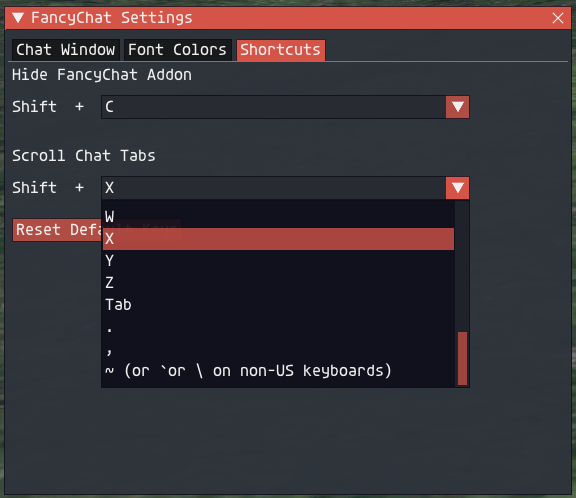
The early settings window: Chat Window, Font Colors and Shortcuts.
Which brings me to the names. At this point changes were coming in very fast, mostly because I was going through my bug list at a crazy speed, and I was getting lost among the version numbers. I only wanted a backup for every change, so I started naming them in a silly way. That is how SUPERMEGA-BETA-VERSION became SUPERMEGA-BITLESS-BETA, then BITMORELESS, then ALMOSTNOT, and then “MEW” showed up. More on that in the next section.
February 2025: the MEW betas
Count them: in January and February there are 36 archives, and from the end of January on almost every one of them has “MEW” in its name. SUPERMEW-ALMOSTMEW-BETA, MIGHTYMEW-WINKYMEW, NOPANICMEW-ONLYPARTYMEW, BOINGBOING-MEWMEW-UHUH. As I said, the names are mostly noise, with one funny exception: TESTYMEW-CHANNELSMEW really is the one where messages started to be tagged with their chat channel. The rest are just my way of keeping my sanity while making dozens of small changes.
This is the month where FancyChat became a real product, and where most of the features that you can still see today appeared. The built-in manual was born as a placeholder (its first text was a joke paragraph and a full lorem ipsum, I am not kidding), and it grew a search box over the following days. A few days later it received the disclaimer that is still there today, and that I think describes the spirit of the whole project well:
This project is the result of a hobby, a hobby in which I ended up throwing dozens of hundreds of hours. While it was my goal to get as close to perfection as I could, in the end I had to decide on a development state that was good enough. If you are reading this, this is such state.
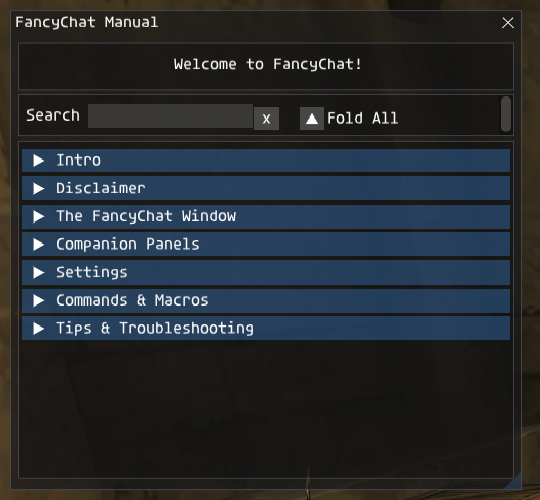
The manual in its current form.
Another thing that appeared in those days was GuideMe, a little window where you paste the address of a wiki walkthrough and read it without leaving the game. It loads the page from ffxiclopedia or BG-Wiki through luasocket and extracts just the walkthrough section with Lua patterns, which is less fancy than it sounds and more fragile than I would like:
-- (condensed)
response, status, headers = http.request(fcw[1].GuideMeURL[1])
-- only for the two wikis this was written for
local walkthrough = response:match("(<h[1-3]>.-Walkthrough.-</h[1-3]>.-<div class=\"printfooter\">)")
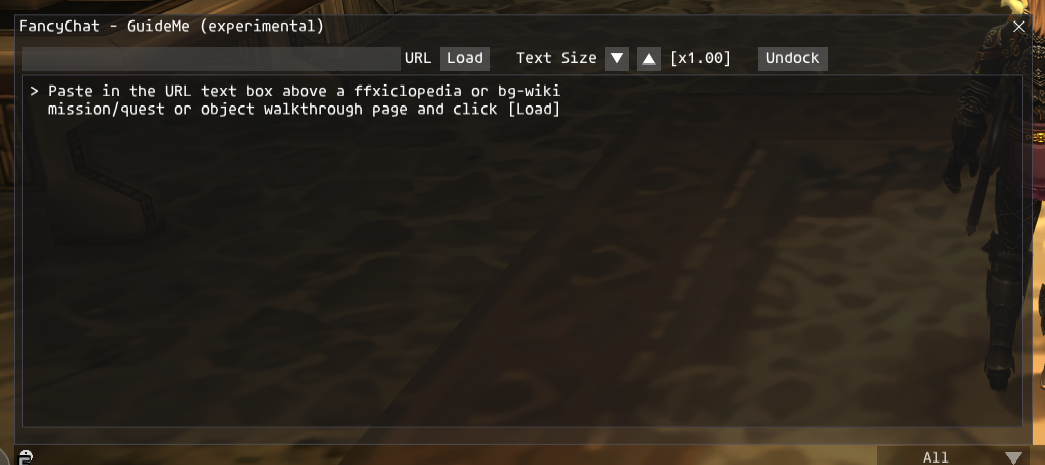
The GuideMe window today (shown empty, before loading a page).
And here it is in a later version with a walkthrough loaded from ffxiclopedia:
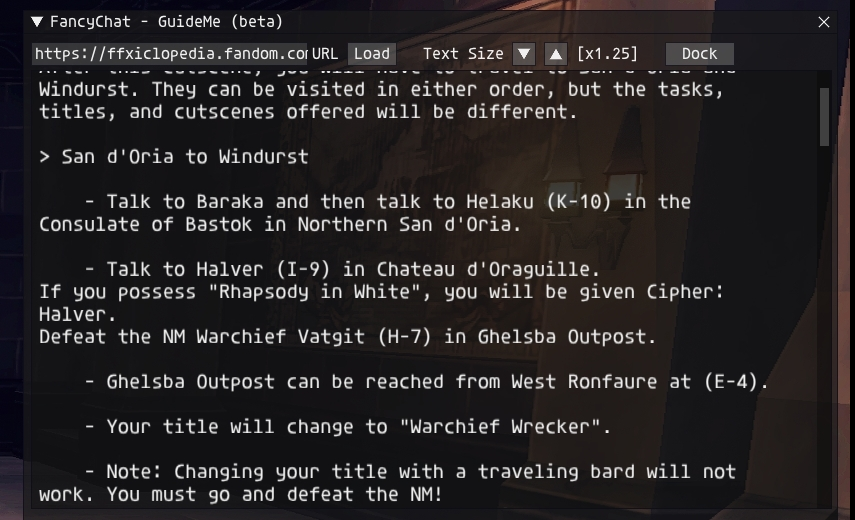
GuideMe with a quest walkthrough loaded (text size adjustable, dockable).
The chat itself learned to get out of the way of the game. A real chat replacement has to deal with the fact that the game opens menus and dialogs exactly where you decided to put the chat, so I read the game’s own state from memory (is a menu open? which one? is a dialog waiting for input?) and slid the chat window away when needed. In the early version it was a bunch of loose variables, and by the middle of the month it needed menu names like inventor, magic, mount or comyn. The menu name is simply a string that the game keeps in a structure, and reading it is a matter of following pointers:
local MenuID = ashita.memory.read_uint32(uiw.MenuPtr)
if MenuID ~= 0 then
	MenuName = ashita.memory.read_string(ashita.memory.read_uint32(MenuID + 4) + 0x46, 16);
	MenuName = string.gsub(MenuName, '\x00', ''):trimex()
The menu name alone was not enough, though, and this is the part that gave me a rough time, being not that expert in reverse engineering. The game uses the same kind of menu, the one that lets you pick an item from your inventory, in a lot of different places: trading, the market, the equipment screen, the inventory itself, the synthesis menu (the one in the screenshot below) and, in general, whenever a menu asks you to choose something from your bags. In the game’s data that shared menu is called inventor (there is a separate equip menu too), so reading its name told me nothing about where I really was. Each of those places deals with the item preview in a different way, so the chat had to be moved out of the way with a different strategy for each of them to avoid overlapping the preview.
The first ingredient was the description of the highlighted item. So I went hunting for it: I traced the function calls looking at the memory view in Cheat Engine until I found the part of the structure that contains the description, and then I wrote the chain of pointers that leads to it. This is the tiny debug panel I used while chasing it, with the first successful read at the bottom:

The debug panel showing the description of the highlighted menu entry.
The description told me what I was doing, but not how I got there, and the same inventory menu can be opened from the main menu, from a synthesis or from a trade. The second ingredient was memory of my own: every frame FancyChat reads the menu that is open (its name, a second value that the game keeps next to it and, for the inventory menu, the description) and saves it in a list that works like a trail of breadcrumbs, one entry per menu opened on the way. A new menu is added at the end of the trail. If you go back to a menu that is already in the trail (for the inventory menu that means the same description and a second value that did not go down) everything that was opened after it is removed, and when the menus close the trail is emptied:
-- (condensed) one entry per open menu: { name, extra value, description }
local MenuLabel = { MenuName:gsub('[%s]+',''), MenuExt, '' }
if MenuLabel[1] == 'menuinventor' then
	MenuLabel[3] = UpperMenuString      -- description, read through the pointer chain
end

-- going back to a menu that is already in the trail: drop what was opened after it
for M_i = #uiw.MenuList-1, 1, -1 do
	if (MenuLabel[1] == uiw.MenuList[M_i][1] and MenuLabel[1] ~= 'menuinventor')
	or (MenuLabel[1] == 'menuinventor' and MenuLabel[1] == uiw.MenuList[M_i][1]
		and MenuLabel[3] == uiw.MenuList[M_i][3] and MenuLabel[2] >= uiw.MenuList[M_i][2]) then
		for R_i = M_i+1, #uiw.MenuList do table_remove(uiw.MenuList, #uiw.MenuList) end
	end
end
if #uiw.MenuList == 0 or uiw.MenuList[#uiw.MenuList][1] ~= MenuLabel[1] then
	table_insert(uiw.MenuList, MenuLabel)
end
Then the trail is read as a whole. If the inventory menu is somewhere in it, the chat has to move out of the way of its item preview. But if the same trail also contains one of the menus that show the preview somewhere else (equip, crafting, trade, delivery, hand-over, bank, loot, shop selling…), the chat uses the other strategy and does not move:
for i = 1, #uiw.MenuList do
	if     uiw.MenuList[i][1]:find('menuinventor') then uiw.InvIdx = i
	elseif uiw.MenuList[i][1]:find('menuequip')    then uiw.NoShiftIdx = i
	elseif uiw.MenuList[i][1]:find('menutskill1')  then uiw.NoShiftIdx = i   -- crafting
	elseif uiw.MenuList[i][1]:find('menutrade')    then uiw.NoShiftIdx = i
	-- ... delivery, hand-over, bank, loot, shop selling and a few more
	end
end

if uiw.InvIdx > 0 then mvc.Menu1 = true end        -- inventory preview: move the chat
if uiw.NoShiftIdx > 0 then mvc.Menu1 = false end   -- ...unless we came from one of those
There are a few special cases on top (the sort menus that open above the spells, abilities, mounts and emotes lists, and the auction house, which needs a fake first entry to look like the rest), but that is the idea: the same menu is not the same situation depending on the path that led to it.
All this time, the question of text was growing into an obsession. Remember the garbled boxes in the BetterChat screenshot? FFXI’s chat is not UTF-8, and it is not even plain Shift-JIS: the game uses its own variant that decorates the standard code points with custom glyphs (stars, arrows, the brackets that wrap auto-translated phrases, element symbols…). My answer, at the end of January, was an approach where the incoming text is turned into a table of byte values, a few rewrite rules replace known sequences with negative “placeholder” numbers, and a last step maps those numbers to real UTF-8 characters:
intString = utils.ReplaceInts(intString, utils.badStrings);
intString = utils.CleanInts(intString);
cleantext = utils.int2text(intString, {0x276e, 0x276f, 0x25C7, 0x25C6, 0x2605})
It was clumsy, and the rules multiplied as I found more characters, but it worked well enough to carry FancyChat for more than a year. (Spoiler: in 2026 the whole thing gets replaced by a single pass over the bytes. We will get there.)
By the end of February the add-on had also grown a first packet_out hook, alliance combat filtering and a choice of separators for the compact combat line. The last archive of the month is the first one with version 0.3: clicking a line copies it, Shift+click saves it in a Notepad that can now hold ten notes, periodic timestamp lines can be echoed into the chat, and a plain text file lets you hide combat lines containing certain words, which later got a tab of its own in the settings:
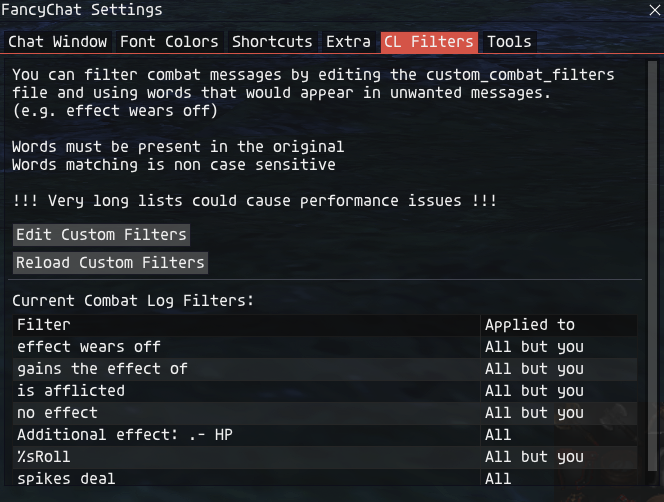
The combat filters tab (it was called “CL Filters” at the time).

The Notepad today (notes saved with Shift+click).
Switching characters deserves a mention. A chat replacement has to cope with the fact that you can log out and in with a different character without closing the game, and each character needs its own settings and its own, empty, chat. Before I had a solution, switching character looked like this: Ashita’s settings library choked on a table that did not exist yet, and the whole add-on unloaded itself:
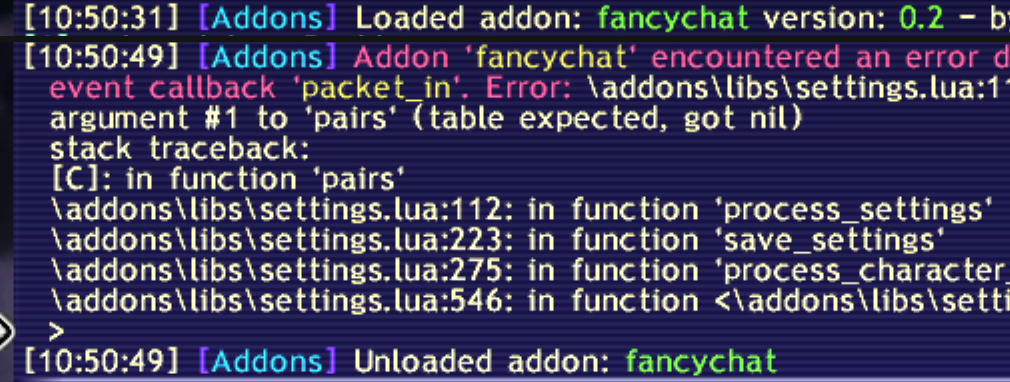
An early crash when switching characters (settings.lua, pairs on a nil table).
The mechanism that I had to implement is simple in theory. FancyChat keeps track of who is logged in, and when the name it sees is not the one its settings belong to (or right after a login), it waits a short moment, saves, flags itself as closing and asks Ashita to reload it, so the new character starts with their own settings and a clean chat:
-- (condensed)
if fcw[1].LoggedIn and #settings.name > 0 then
	if fcw[1].LoggedLobby == 1 or (fcw[1].PlayerName == '---') then
		if fcw[1].ReLogStart == 0 then
			fcw[1].ReLogStart = os.clock()
		elseif (os.clock() - fcw[1].ReLogStart > fcw[1].ReLogCD) then
			allSettings.PlayerName = settings.name;
			SaveSettings();
			fcw[1].Closing = true;
			AshitaCore:GetChatManager():QueueCommand(1, "/addon reload fancychat")
		end
		return
	end;
	fcw[1].PlayerName = settings.name;
It works, with one funny side effect that I only rediscovered while preparing this post: the add-on reloads itself by name, so a copy of an old version running under a different name happily reloads the real FancyChat instead.
Spring 2025: a break
After the BOINGBOING archive there is a silence in my backups that lasts months. I was burned out, so I diverted my attention to other projects for a few months. I did not stop using FancyChat, though: I kept playing the game with it, writing down ideas, and expanding the bug list every time something went wrong.
Summer 2025: Legacy, colours, and my own version of a DLL
When I came back, in July, I was working in a folder that I now call fancychatLegacy (version 0.4). “Legacy”, for me, is everything that came before the big refactoring of 2026: all the versions with a single huge fancychat.lua.
Colours were the problem that pushed me to modify Thorny’s library. A chat line in FFXI can have several colours, and I wanted my lines to look as good as the game’s own. gdifonts draws a whole string in a single colour, so until then I had been cheating with what I called the Aux buffer: every chat line was stored as two pieces, a main text and an auxiliary text with its own colour, drawn by two separate font objects, with the second texture aligned right after the first one. The welcome line that FancyChat prints when it loads is a good example (“– Welcome to” in white and “FancyChat –” in blue), and so is the [link] marker at the end of the lines that contain an address:
table.insert(chatBuffer[1][2].text,    '-- Welcome to');
table.insert(chatBuffer[1][2].auxText, 'FancyChat --');
-- ... and when a line is drawn, both pieces travel together:
UpdateLines(1,
    b_ChatBuffer[mode][2].text[bufferIdx],    b_ChatBuffer[mode][2].color[bufferIdx],
    b_ChatBuffer[mode][2].auxText[bufferIdx], b_ChatBuffer[mode][2].auxColor[bufferIdx]);
That works for two colours, as long as you know where the split is. I felt it was a limit: the chat would never look good if it could not reproduce multi-coloured lines like the actual chat of the game does. I had even tried to highlight the actor and the target without colours, with square brackets around the name of the actor and no brackets around the target, but it was still not easy to read, so coloured lines became a necessity. So I stole the idea from the original game: tags placed before the text that I want to colour, and a tag to go back to the default colour (handy, for example, to highlight certain words inside a message). I did not try anything else first, I went straight for the tag system, and I modified Thorny’s DLL to understand it.
I had worked with C++ before, but I had no idea how fonts were rendered, so the first weeks were a lot of trial and error. The first modified DLL appears in July (the original is 122,880 bytes, my first version is 128,000) and exports a new function, CreateTextureColor. On the Lua side, the change is a single line in fontobject.lua:
local tx = self.renderer.CreateTextureColor(self.interface, CreateFontData(self.settings));
The first tag format that I used was !RRGGBBAA?</span>, built in August by a small MC() helper, and a few weeks later it became the format that is still used today: a backslash, the character “§”, two characters for the alpha (ignored), six hex digits for the colour, the character “ç” and a closing backslash. A tag with dashes instead of digits, \§——–ç</span>, brings the text back to its original colour. The helper that writes a tag is tiny:
utils.MC = function(color)
	if color == 'reset' or color == '' then
		return '\\§--------ç\\'
	end
	local colortext = string.format('%08X', tonumber(color))
	return '\\§'..colortext..'ç\\'
end
The first version of the system had one big problem: feeding something wrong to the DLL crashed the game, with no error message at all. So I wrote a function that checks the syntax of the tags before they get anywhere near the DLL: it moves any spaces that sit between two tags after them, and it makes sure that every tag that opens is properly closed, otherwise it returns an error text instead of the line:
utils.MCCheck = function(text)
	text = text:gsub('(ç\\)(%s+)(\\§........ç\\)', '%1%3%2')
	local idx = 1
	while true do
		local f1 = string.find(text, '\\§', idx, true)
		if not f1 then break end
		if not string.find(text:sub(f1 + 11, f1 + 13), 'ç\\', 1, true) then
			return 'Bad MC format'
		end
		idx = f1 + 4
	end
	return text
end
On the other side of the fence, this is the heart of the parser in the DLL, in its current form:
if (wBuffer[i] == L'\\' && i + 1 < length)
{
    if (wBuffer[i + 1] == L'§' && i + 9 < length)
    {
        if (wBuffer[i + 10] == L'ç' && wBuffer[i + 11] == L'\\')
        {
            if (wBuffer[i + 2] == L'-')
            {
                currentColor = originalColor;   // reset
                i += 12;
                continue;
            }
            else
            {
                int a = (data.FontColor >> 24) & 0xFF;   // alpha comes from the global color
                int r = (hex1(wBuffer[i + 4]) << 4) | hex1(wBuffer[i + 5]);
                int g = (hex1(wBuffer[i + 6]) << 4) | hex1(wBuffer[i + 7]);
                int b = (hex1(wBuffer[i + 8]) << 4) | hex1(wBuffer[i + 9]);
                currentColor = Gdiplus::Color(a, r, g, b);
                i += 12;
                continue;
            }
        }
    }
}
Is this the elegant solution? Not really. But the nice side effect is that every layer of FancyChat can add colours as if they were ordinary text.
Later on I also taught FancyChat to parse the original colour tags of the game (two bytes, 0x1E or 0x1F followed by a palette number) and translate them into my own, so that I had full control over my formatting and could also reproduce, in their original form, the coloured parts of the messages that come from the game. After that, the sky was the limit, and I made extensive use of the tags in the combat log: the target that the player hits, the player being hit, the player missing, and so on, to highlight what the player does in the sea of combat messages. The parser collects the ranges that must be coloured and splices the tags into the line:
table.sort(MCList, function(a, b) return a[1] < b[1] end)
for i = 1, #MCList do
	local mcoff = 28 * (i - 1)      -- each open + reset pair adds 2 x 14 bytes
	mctext = string_sub(mctext, 1, MCList[i][1] + mcoff)
		..utils_MC(MCList[i][3])
		..string_sub(mctext, MCList[i][1] + 1 + mcoff, MCList[i][2] + mcoff)
		..utils_MC('reset')
		..string_sub(mctext, MCList[i][2] + 1 + mcoff, #mctext)
end

buf1.text[#buf1.text] = utils_MCCheck(mctext)
I should say that if you are writing your own add-on and you only need a font library, please use Thorny’s original. Mine is tangled with FancyChat’s pipeline and I do not maintain it as something general. (Thank you, Thorny, for tolerating the fork!)
August brought what I consider the first real rework of the code (version 0.6): 16 separate colour settings collapsed into a single colour table, colour sets that can be exported and imported, tracking of who is acting on whom in combat lines, limits for the size of the buffers, and a function that destroys all the graphics objects when the add-on is unloaded. That last one came from a problem that I had to chase: every time I reloaded the add-on while testing, memory was being leaked.
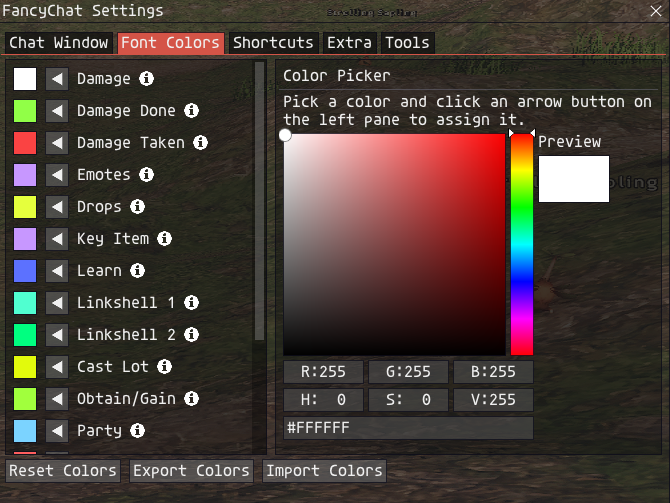
The colours tab of that period, with the picker and the export and import buttons.
In September and October the add-on gained a lot of small things: chat word alerts, auto-hide of the window, hover previews of items, abilities and spells, detection of HELM results (digging, logging, mining…), and a “Custom” tab where you choose which messages go, replacing the old NPC tab.

Choosing what goes in the Custom tab.
Two folders from those weeks deserve a mention. One is called fancychatClean: a version cleaned up for release, with almost all the commented-out code removed (the debug window and its commands were deleted, and so were many comments). The other one is fancychatPre430, which is simply the last version before Ashita 4.30. Later on, compatibility with both generations of the interface is handled by a tiny wrapper that checks the version and decides how to call the functions that changed:
local IntVer = Addons:GetInterfaceVersion()
local IntVerNew = 4.3
imguiWrap.isNewVer = IntVer >= IntVerNew
October 2025: icons, emojis, and a combat log that finally made sense
This is the month where the combat log became what it is today. The compact format with abbreviations such as DMG (the “>” between target and damage) was already clear, because short terms like that are simply easier to read. What was missing was a way to see at a glance who is who in a hundred lines of combat messages, and colours and icons are what finally made it work.
The idea was to replace words with icons and use colours to identify roles, but for that, the text renderer needed to learn some new tricks. Over the second half of October my DLL grew every few days (132 KB, then 134 KB, then 137 KB): first it learned to use Windows’ Segoe UI Emoji for characters outside the basic plane, then Segoe UI Symbol for arrows and technical symbols, and finally to load a private font from a file: gameicons.ttf, an icon font built from the icons of game-icons.net. Every code point in the “private use” range of Unicode ends up drawn with that font:
if ((cp > 0xE000 && cp < 0xEF02) && hasCustomFont)
{
    // flush any buffered text before the special glyph, then draw
    // this one code point with the private icon font
    glyphPath.AddString(&ch, 1, g_customFont, data.FontFlags, data.FontHeight-1, pos, &fontFormat);
    ...
}
On the Lua side, there is a table with the code points of each icon (a sword, a bow, a spell, a heal…) and the combat parser builds its lines from it:
local combatCP = {
	RA    = icons.RA,
	PUM   = icons.PUM,
	CRIT  = utf8.char(0x1F4A5),
	ATK   = utf8.char(0x1F5E1),
	SPLIT = utf8.char(0x1F81E),
	CAST  = icons.CAST,
	SPELL = icons.SPELL,
	HEAL  = icons.HEAL,
	...
}
-- ...
msg = A..' '..combatCP.ATK..' '..B..' '..combatCP.SPLIT..' '..DMG..' DMG'
There is a funny detail in all this. The dagger emoji (U+1F5E1) that marks a melee hit is not drawn as it comes: the blade pointed towards the actor who made the attack, which was not intuitive, when it should point towards the name of the target in the message. So the DLL builds the glyph’s outline as a path, flips it around its own centre, and draws the flipped path. Small things like that are what the “fork” is made of.
And this is how it looked on screen: drops from a mob with their item icons, and a melee hit with the sword icon (the actor’s name is blurred):

Drop lines with icons.

A hit with the icon combat format.
The same pipeline also draws the auto-translate brackets in colour, and emojis:

Auto-translate phrases between coloured brackets.

Emoji faces, straight in the chat.
October is also the month of emojis.lua (a table of about 1,400 emoji names that turns tokens like :smile: into the right characters, used for the messages that come from CatsEyeXI’s Discord bridge), and the version number jumped to 0.9.
Winter 2025: BigMode
Between November and January the only major addition was BigMode, a full-screen overlay with the history of the chat that you can open with a command or a shortcut. It shares the same buffer as the main chat window, so there is nothing to synchronise, just a bigger place to read and scroll through. I was quite sick during those months, and BigMode was the only big thing I managed to add.
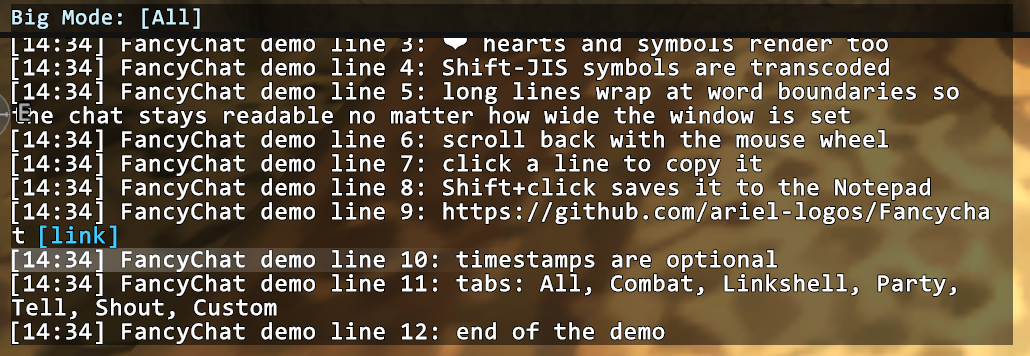
BigMode. (The middle of the history is cropped on purpose, to keep other players’ messages out of the picture.)
February to April 2026: a version number, an alarm, and a gamepad
From February on, the archives have dates in their names, and the version string follows the same rule: it ends with the date of the build as YYMMDD. The add-on was still a single file, of about 8,400 lines by then, and getting harder to work in.
In that same month appeared a warning for R0s. An R0 is what happens when the network status widget of the game shows 0 packets received, which indicates that a disconnection may be happening. FancyChat reads the value behind that widget, and when it stays at zero for more than five seconds it prints a warning in the chat, with a small CatsEyeXI-specific extra: if it was a server crash and you used a pop item, take a full screenshot as proof.
The signature that finds that widget in memory was given to me directly by atom0s:
ashita.memory.find('FFxiMain.dll', 0, '8935????????81C6????????56E8', 0, 0)
In March came the gamepad navigation: while you hold a modifier button, the shoulder buttons cycle through the tabs and the face buttons open BigMode, snap to the bottom or open the chat input. The bindings are a small table, and I added the possibility to rebind them later:
GamepadBindings = {
    modifier         = 8,   -- LB: hold to enable navigation mode
    cyclePrimaryTab  = 9,   -- RB
    cycleSecondaryTab = 17, -- RT
    snapToBottom     = 13,  -- B
    toggleBigMode    = 15,  -- Y
    openChatInput    = 14,  -- X
    submitInput      = 12,  -- A
}
April 2026: eight thousand lines on a diet
By now the file was far too big for me to keep in my head. The last single-file builds are from March, and right after them, at the end of April, I did what I had been avoiding for months: I took everything apart. This time I used an AI coding assistant for the whole job: the refactoring, the code cleanup and the bug fixing. It was supervised like everything else I do, not an automatic process, and moving thousands of lines of code around without breaking anything is exactly the kind of job where an extra pair of hands pays for itself. The leftovers in my folders tell the story of one very long working session. It started with a snapshot of the monolith (363 KB), continued with a command-line LuaJIT, compiled to syntax-check every module as it came out (and, as you will see, to chase a bug), and by the evening the main file was a 58-line entry point that just loads fourteen modules from a lib/ folder. Its header comment says it all:
--[[
	FancyChat entry point.

	All addon logic lives under lib/.  This file does three things:
	  1. Sets the addon descriptor (name/author/desc/version)
	  2. require()s every lib/* module.
	  3. Calls each module's register() to install the Ashita event handlers.

	Shared mutable state (chat buffer, font objects, window geometry,
	parser cursor, etc.) lives in lib/state.lua.  Every module aliases
	the same tables via `local x = state.x`, so a mutation in one module
	is visible in every other.
]]
That last sentence is the one that makes the whole thing work in Lua. Every shared variable is a table, never a plain number or a string, because a module that does local x = state.x captures the table and not a copy of a value, so all the modules see the same data. To be sure that nothing had changed, I kept both versions going side by side for a while, going back and forth between them to compare the results, until I finally swapped to the new one. Code was moved, not rewritten: the 363 KB file became about 8,600 lines spread over the modules, plus the 58-line entry file.
With everything in smaller pieces, I could finally make it faster. The next checkpoints are called preOpt and preStrip in my backups, and the changes are all over the place: the functions of the standard library and of ImGui that are used on every frame became local variables (calling a local is cheaper than looking up a function in a global table, and LuaJIT can optimise it better), values that were recomputed on every frame were cached, and a lot of commented-out code was removed. Some of the comments I left to myself in those days are very telling:
-- Localised stdlib references (#12).  These are hot in the layout pass
-- and the per-frame line shifting; LuaJIT inlines them better when
-- they're locals than when they're table accesses.

-- Precomputed highlight colours. Both alpha values are constants,
-- so the U32 result never changes; the previous code recomputed and
-- reallocated the {r,g,b,a} table per highlighted line per frame.
And then there is the bug that had been pestering me for ages. When you hover an item in the chat, a little preview window opens, and for a few frames that window kept changing its size, with the same item and the same text. Everything pointed to some non-deterministic part of my algorithm (the one that counts how many rows a text takes to fit the window), but I was sure it was deterministic, and I was never able to find the cause.
During the refactoring the AI went at it step by step. First it added diagnostics to the hover code: the size of the text, a hash of its bytes, the font measurements, and even a call to the row counter twice in a row with identical arguments. The theories that I (and it) had, such as a drifting width or sub-pixel differences in the font size, were eliminated one by one by the data. Then it rebuilt the exact same text in the standalone LuaJIT that had been compiled for the syntax checks. Outside the game the function returned 8 rows every single time. Inside the game it returned 8, then 9, 10 or 11, and in one frame two consecutive calls with the same input gave different answers, which is simply impossible in plain Lua. The only explanation left was LuaJIT’s tracing compiler: once a function is called often enough, the JIT records a trace of it, and for this particular shape of code the trace was wrong. The fix is to tell LuaJIT to leave that function alone and to flush any trace it had already built for it, just in case Ashita’s Lua state survives an unload and a load:
-- LuaJIT 2.1 mis-compiles CalcRows once the trace recorder picks up its
-- while-loop / `text = text:sub(...)` rewriting body: the JIT'd trace
-- returns inconsistent results across consecutive calls with identical
-- inputs.  That makes item-hover popups resize themselves a few frames
-- after first appearing.  Pinning the function to the interpreter
-- sidesteps the bug; flush evicts any trace built before this point.
if jit and jit.off then
	jit.off(utils.CalcRows, true)
	if jit.flush then jit.flush(utils.CalcRows, true) end
end
A very similar thing happened later with colours: Lua numbers with a high alpha byte are negative when stored as signed values, and, after a few frames, LuaJIT’s FFI would silently turn the first negative value passed to a field of the DLL into a zero, making colours disappear at random. The workaround is a tiny function in fontobject.lua and rectobject.lua that makes sure the number is always positive:
local function uint32_of(n)
    if n < 0 then return n + 4294967296 end
    return n
end
The other big change of that day was text. After a year and a half of byte tables and rewrite rules, I replaced the whole pipeline with a single pass over the bytes. The idea: a flat table maps each two-byte FFXI sequence directly to the right UTF-8 string, and a loop walks the text once, deciding for each byte what to do with it (FFXI’s native colour escapes, ASCII, a two-byte sequence, or something that is already UTF-8):
-- Codepage map: raw 2-byte FFXI sequence -> pre-encoded UTF-8 string.
-- Pre-encoding avoids per-call utf8.char() allocations.
utils.FFXI_MAP = {
	['\x81\x40'] = ' ',                 -- ideographic space -> ASCII space
	['\x81\xA8'] = utf8.char(0x2192),   -- right arrow
	['\x81\x7E'] = utf8.char(0x2715),   -- FFXI: red X marker
	['\x81\x9A'] = utf8.char(0x2605),   -- star (CEXI custom)
	['\xEF\x27'] = utf8.char(0x276E),   -- auto-translate open
	['\xEF\x28'] = utf8.char(0x276F),   -- auto-translate close
	['\xEF\x1F'] = '[fire]',
	-- ... and many, many more.
}

-- Single-pass byte walker.
utils.TranscodeFFXI = function(text, compactCombat, respectLegacyColors)
	local out, n = {}, 0
	local i, len = 1, #text
	while i <= len do
		local b = string.byte(text, i)
		if b == 0x1E or b == 0x1F then          -- legacy colour escape
			-- keep or drop the 2 bytes
			i = i + 2
		elseif b >= 0x20 and b <= 0x7E then     -- printable ASCII
			n = n + 1; out[n] = string.char(b)
			i = i + 1
		elseif utils.SJIS_LEAD[b] then          -- 2-byte sequence: look it up
			local mapped = utils.FFXI_MAP[string.sub(text, i, i + 1)]
			if mapped then n = n + 1; out[n] = mapped end
			i = i + 2
		-- ...
(Condensed here, the real one handles a few more cases.) The table grew entry by entry as new glyphs turned up, and there is even a comment in the code about a block of circled numbers where I found that thirteen entries share the same key, so only the last one ever fires. That is the kind of thing you only notice when you look at the code again with fresh eyes.
May 2026: maps, credits and a release
The new code base brought many other things, almost as a side effect of having a code I could finally work with. A local browser of zone maps (over two hundred zones, roughly 900 images, with sections for maps, treasure, fishing, weather and notorious monsters) replaced a first version that downloaded wiki pages at runtime, and converting the images from PNG to JPG, together with smaller sounds, halved the size of the add-on. A Credits tab appeared and colour sets became selectable. The maps come from FFXIclopedia, downloaded in bulk with a small script.
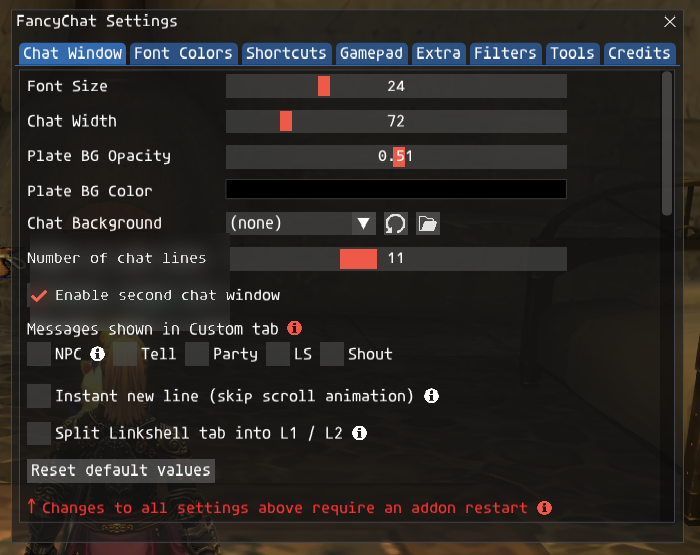
The settings window today (its first tab). The rest of the tabs are Font Colors, Shortcuts, Gamepad, Extra, Filters, Tools and Credits.
Then came the day this whole project had been aiming at. In May 2026, a few weeks after the refactoring, I released FancyChat for CatsEyeXI. I am part of the CatsEyeXI team as a developer, and making FancyChat for it was my goal from the very beginning. CatsEyeXI is also a private server that, for reasons that have nothing to do with this add-on, is not welcome in the main places where the private server community meets and discusses, so I could not publish the CatsEyeXI version publicly in those places. I never wanted to burn any bridges because of that: I am grateful for the help I got from the community, and I kept trying to contribute.
The updates kept coming in the following days: the gamepad bindings got their own settings tab (with rebinding), the combat and “other” filters moved into folders of their own, and a first version of the packet-based combat module appeared, even if the parser was not using it yet.
A side project also came out of those days: FancyCompass, a separate add-on that replaces the game’s compass and clock. It needs to know where FancyChat’s window is, so FancyChat sends its position through a local UDP port, with a port derived from the process id so that several game clients do not step on each other. It is just technical plumbing, and anyone curious can find the details in the code.
Summer 2026: packets, an input bar, and a new DLL
With the code in order and real players using it, I could finally go back to a problem that had been bothering me since the beginning: how to decide who a combat line is about. For more than a year the answer had been to match words in the text (“You”, names of party members…), which is fragile. The proper answer is in the packets: the server sends an action packet (0x0028) with the id of the actor and of every target, so the actor can be classified as you, your pet, a party member, an alliance member or someone else without reading a single word of text. I wrote a module for it, adapting the packet decoding from the Azu-XI fork of atom0s’ simplelog, and the result is a filter with levels from “everyone” down to “you only”.
function M.dispatch(e)
    if not allSettings.PacketFilterEnabled2[1] then return end
    if e.id == 0x028 then
        pcall(handle_action_packet, e)
    end
end
It also caused some nasty crashes: reading the game’s data from the packet handler raced with the game’s main thread, and it ended in access violations during combat. The fix was to build a snapshot of the actors once per frame on the render thread and classify from it, and, as a precaution, the packet-based filter stays off by default. Users have to choose it, and the text-based filter is still there as the safe option.
In August came another big feature, a chat input bar drawn by FancyChat (with a test mode, its own font size, opacity and background), and background images for the chat plates. The input bar also taught me a small lesson about my own DLL: the text texture is cropped to the visible pixels, so leading spaces simply vanish, and I had to strip them and add them back as an offset measured from the width of the font.
And the DLL itself got its biggest set of changes since October (the default font of FancyChat is Consolas, which the add-on finds among the fonts installed in Windows). Several small fixes landed in the same build: round line joins, because the acute corners of letters like “M” and “w” were shooting black spikes out of the outline; a canvas widened from 2048 to 4096 pixels, because wide plates were being cut at the edge; fonts and font families cached instead of rebuilt for every line. And all the font handling became lazy, because of something I learned the hard way: a GDI+ object created before GDI+ has started is permanently broken, and whether that happens depends on whether another module in the game’s process started GDI+ first, which in turn depends on things like Ashita updates. The comment that I left in the source is as clear as I could make it:
// IMPORTANT: GDI+ objects must NOT be constructed at DLL static-init
// time - that runs before GdiplusStartup, and a GDI+ object constructed
// before startup is permanently broken (every method fails).  Whether
// this bites depends on whether some OTHER module in the host process
// happened to start GDI+ before this DLL loaded - which is exactly the
// kind of environment change an Ashita core update causes.  So the
// PrivateFontCollections are heap-allocated lazily at first use.
That DLL is now 314,368 bytes, more than two and a half times the size of Thorny’s original, but still the same library at heart.
The repository on GitHub became public in the summer of 2026.
Autumn 2026: HorizonXI, the retail server and version 1.0
By July the version string had started to read 1.0 (a test folder of that month already carries 1.0.260721), and its format is the one you see now: major, minor, and the date of the build as YYMMDD. September gave us 1.0.260902 and 1.0.260921, still the builds for CatsEyeXI. The code behind them counts around 15,000 lines of Lua without the manual and the emoji table, spread over 14 modules, and the Credits tab uses the date in the version number to show “created on…”.
My own builds are the ones for CatsEyeXI, and they have a few extras that make no sense elsewhere: quick commands for the server’s custom features, special colours for its server messages, and the emoji conversion for its Discord bridge. In September and October FancyChat finally left CatsEyeXI. I put together a version for the retail server, stripped of everything specific to CatsEyeXI, and later someone from the HorizonXI staff asked me for a version more compliant with their rules, so there is one for HorizonXI too. Those are the official ones you will find on GitHub (the suffix of their version number, R and H, simply stands for retail and HorizonXI).
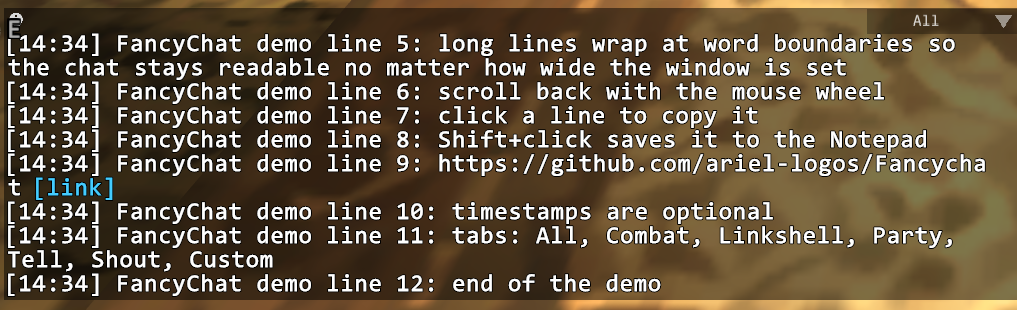
The main chat window, with demo lines that I typed for this post.
What’s next
FancyChat now lives on three servers, and it is a place where I can finally stop and say “good enough” (which, you will remember, is the whole point of the disclaimer in the manual). But the story is not over: a second generation, FancyChat V2, is already in the works. I will tell you more about it when it is ready.
Thank you
This add-on would not exist without the people who shared what they know. The Ashita team and atom0s taught me everything I needed to understand how to read and patch the game client (and gave me the signature behind the R0 warning). Thorny gave me gdifonts and the basics of how fonts are rendered, and tolerated a fork. The authors of the icons at game-icons.net (licensed under CC BY 3.0) made the combat log prettier, the creators of simplelog made the packet decoding of the combat filter possible, and FFXIclopedia and BG-Wiki are where the maps and the walkthroughs of GuideMe come from. The testers found the bugs I could not see: Zeratia, Mod, Carver, Emy and Sky.
Thanks to my family and all my friends who, for the past year, watched me disappear into my room to push this project forward. Even through the countless hours I spent buried in code, you stayed close to me, checking in, dragging me out for a meal, putting up with the late nights and the monologues about chat windows.
And a final thanks to my dad. I am sorry I could not show you the final result: you would have been happy and proud, as you always were with everything I did. I miss you.
If you want to try FancyChat, give it a spin or look at the code, you will find it at github.com/ariel-logos/Fancychat. Bug reports, as I learned the hard way, are the best present.
See you next time! ❤️🐇